Algorithmic reverb
A lush plate reverb with a 70s and 80s digital soul.
Long, chorused tails that sit behind vocals, keys and guitars without crowding them. Audio Unit for Logic Pro, VST3 and CLAP for most other music software.
Free while in beta. Version 0.3.0, built 21 October 2026. By downloading you agree to the licence agreement.

Built around one big dial
Decay sets how long the tail rings, from a tight 0.2 seconds to a 30-second wash. Its arc glows from amber to pink as the tail grows.
While the reverb plays, ripples spread across the record and fade with the tail. Stop playing and they settle, so you can see the space ring out.
See what the tone controls do
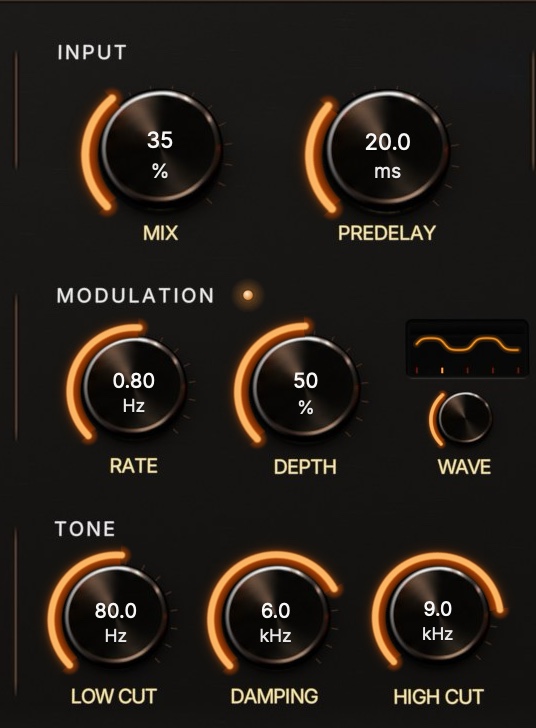
Low Cut and High Cut shape what goes into the reverb: the pink line. Damping is the one that's easy to miss, because it works inside the tail: the high end fades a little more on every pass, so the tail darkens as it decays. The orange line shows the tail one second in.
Lower Damping for a warm, vintage plate; open it up for a bright, glassy one.

Modulation with a shape
Rate and Depth set a slow chorus inside the tail, which is where the vintage shimmer comes from. Wave morphs it from a smooth sine to a rounded square, for a stepped, two-state wobble. The display shows the shape, speed and depth as you turn.
Wave at zero is the classic sound, unchanged.

Ducking keeps the vocal in front
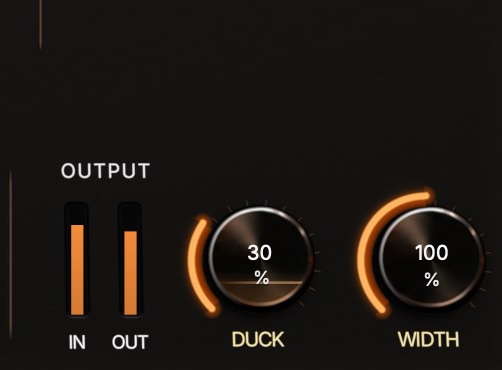
Turn up Duck and the reverb steps back while you sing or play, then blooms in the gaps between phrases. A level glows inside the knob as it works.
Every control in plain sight
Grouped the way they are on the panel.
Input
- Mix
- Balance between dry and reverb, kept even in loudness.
- Predelay
- A gap of up to 500 ms before the tail, to keep vocals clear.
Modulation
- Rate, Depth
- A slow chorus inside the tail.
- Wave
- Morphs that chorus from sine to a rounded square.
Output
- Duck
- Pulls the reverb down while the dry sound plays.
- Width
- Mono tail at 0%, natural at 100%, extra wide at 200%.
Decay
- Decay
- Tail length, 0.2 to 30 seconds.
Space
- Size
- From a small plate to a large hall-like space. The tail display beside it shows the decay.
Tone
- Low Cut, High Cut
- Shape what goes into the reverb.
- Damping
- How quickly the highs fade inside the tail.
Installing the beta
The beta installers aren't signed by Apple or Microsoft yet, so your computer asks you to confirm once.
macOS 11 or later
- Open
HalcyonVerb-0.3.0-macOS.pkg. - If macOS says it can't check the file for malicious software, click Done. Then open System Settings, go to Privacy & Security, scroll down and click Open Anyway.
- Follow the installer. It adds the Audio Unit, VST3 and CLAP versions for all users.
- Restart Logic Pro. You'll find it under Audio FX, then Audio Units, then Halcyon Audio.
Windows 10 or 11, 64-bit
- If your browser says the file isn't commonly downloaded, choose Keep. In Edge it's under the … menu next to the download.
- Run
HalcyonVerb-0.3.0-Windows-Setup.exe. If Windows says it protected your PC, click More info, then Run anyway. - Pick VST3, CLAP or both, and finish the installer.
- Rescan plugins in your music software. The VST3 goes to
C:\Program Files\Common Files\VST3.
About this beta
- This version has a new console look, a Wave control for the modulation shape, and live displays for Tone and Duck. It installs over earlier betas, and projects you made with them open with their settings.
- Formats: Audio Unit (macOS only), VST3 and CLAP. Mono or stereo in, stereo out.
- The Windows version hasn't had much testing yet. If it doesn't show up or misbehaves in your host, we'd like to hear about it.
- Projects you make with this beta should reopen in later versions, but keep backups while things settle.
- More reverb modes and a vintage colour switch are planned.
File checksums (SHA-256)
f18f6766d414dad26a4794aad43b79a6db0be7da0bd6a7a820b1fe98b7938fe3  HalcyonVerb-0.3.0-Windows-Setup.exe
c798ddb6272c1b5dffdef35d7078ec578c2f732112d5c268834c18d558b59548  HalcyonVerb-0.3.0-macOS.pkg